Open Source · Integrated Web Operations Platform

Content,
operations,
data integration —
all in one place.

MintJams CMS is a management platform that unifies content, business processes, and data integration into a single virtual desktop environment inside your browser. With Docker, it becomes your team's workspace in moments.

MIT License Self-hosted Extensible
localhost:8080/desktop
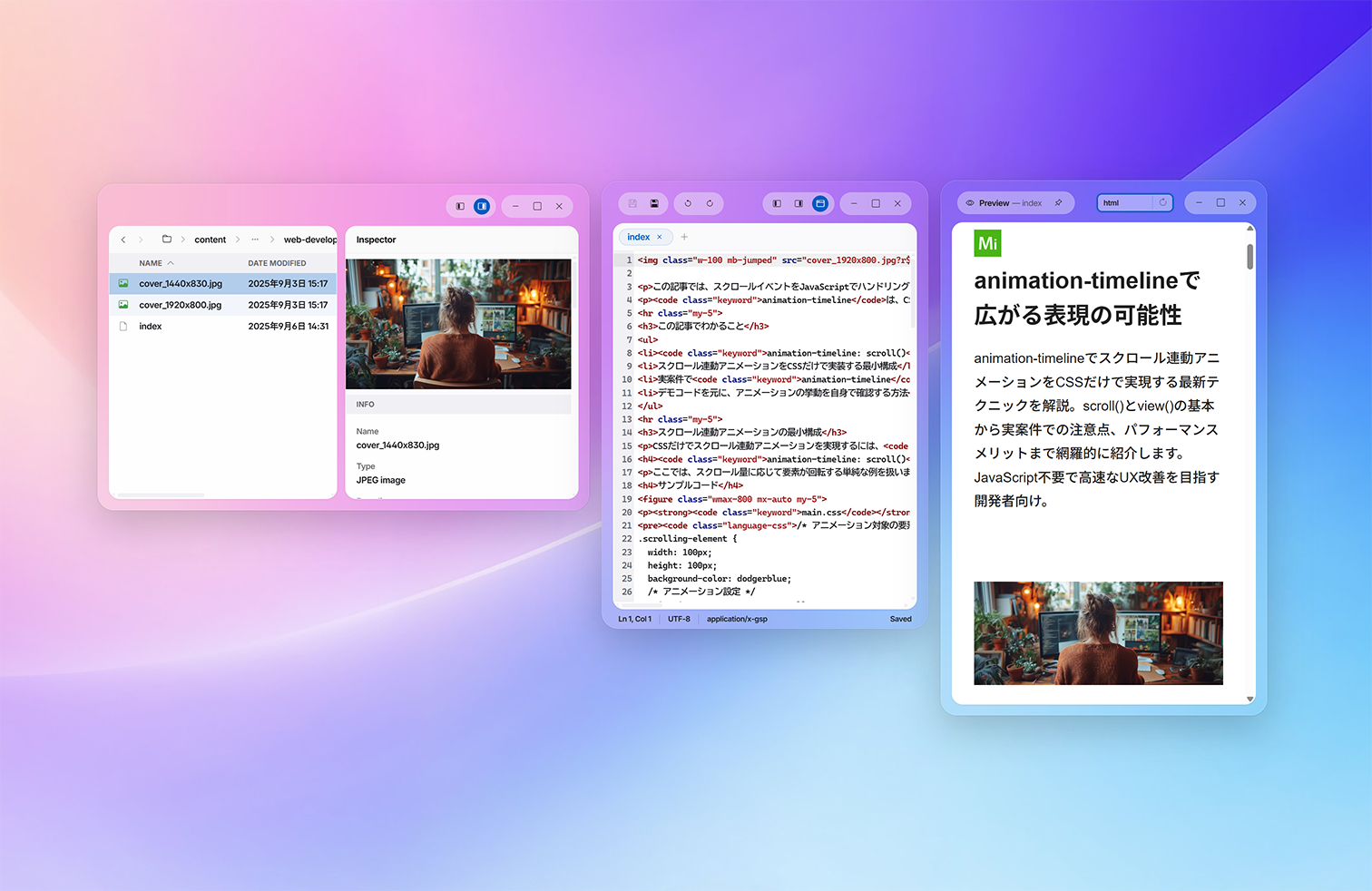
MintJams virtual desktop — content management with Text Editor and Content Browser
localhost:8080/desktop
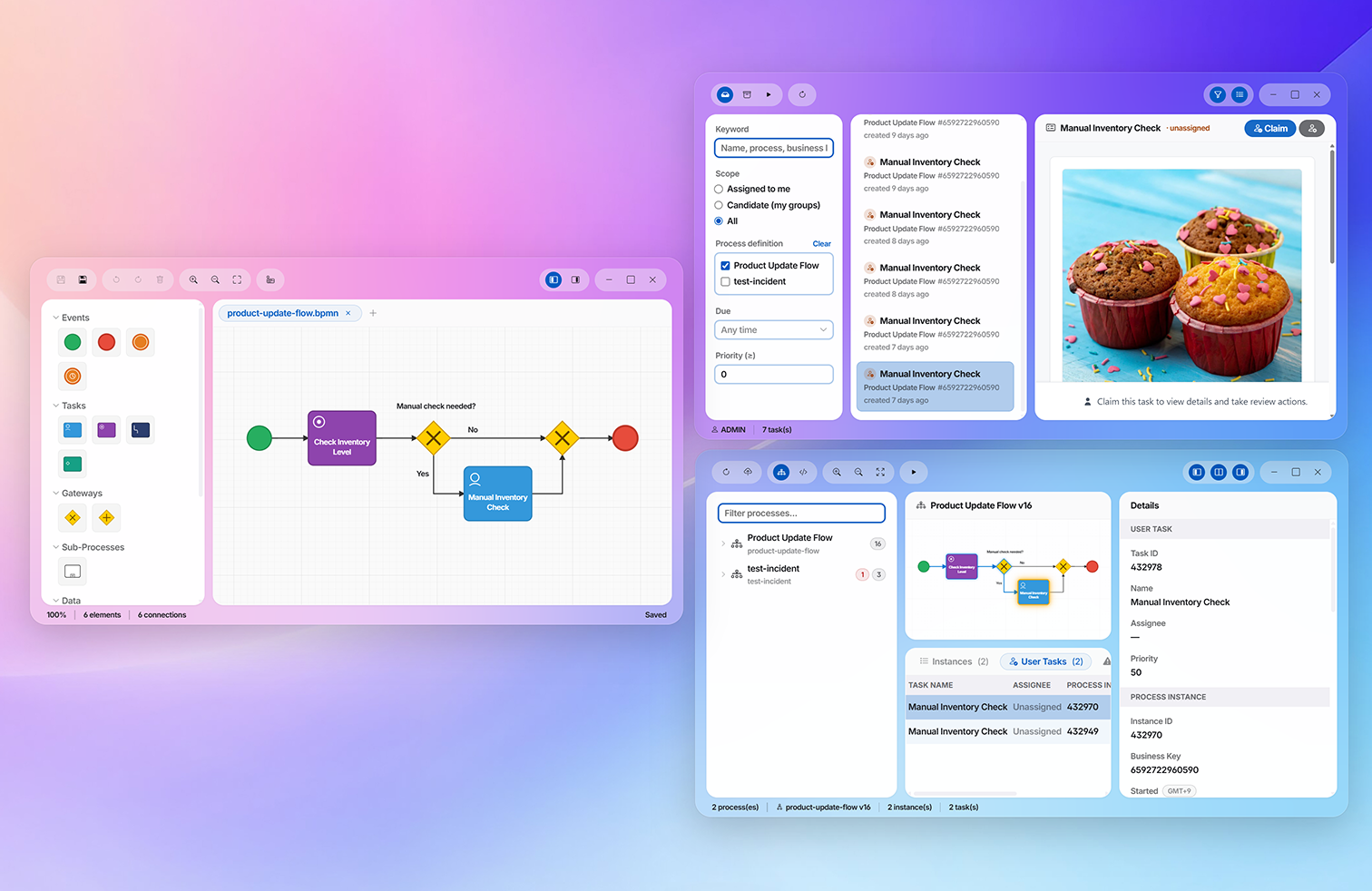
MintJams virtual desktop — business process management with BPMN Modeler, Tasks, and BPM Console
localhost:8080/desktop
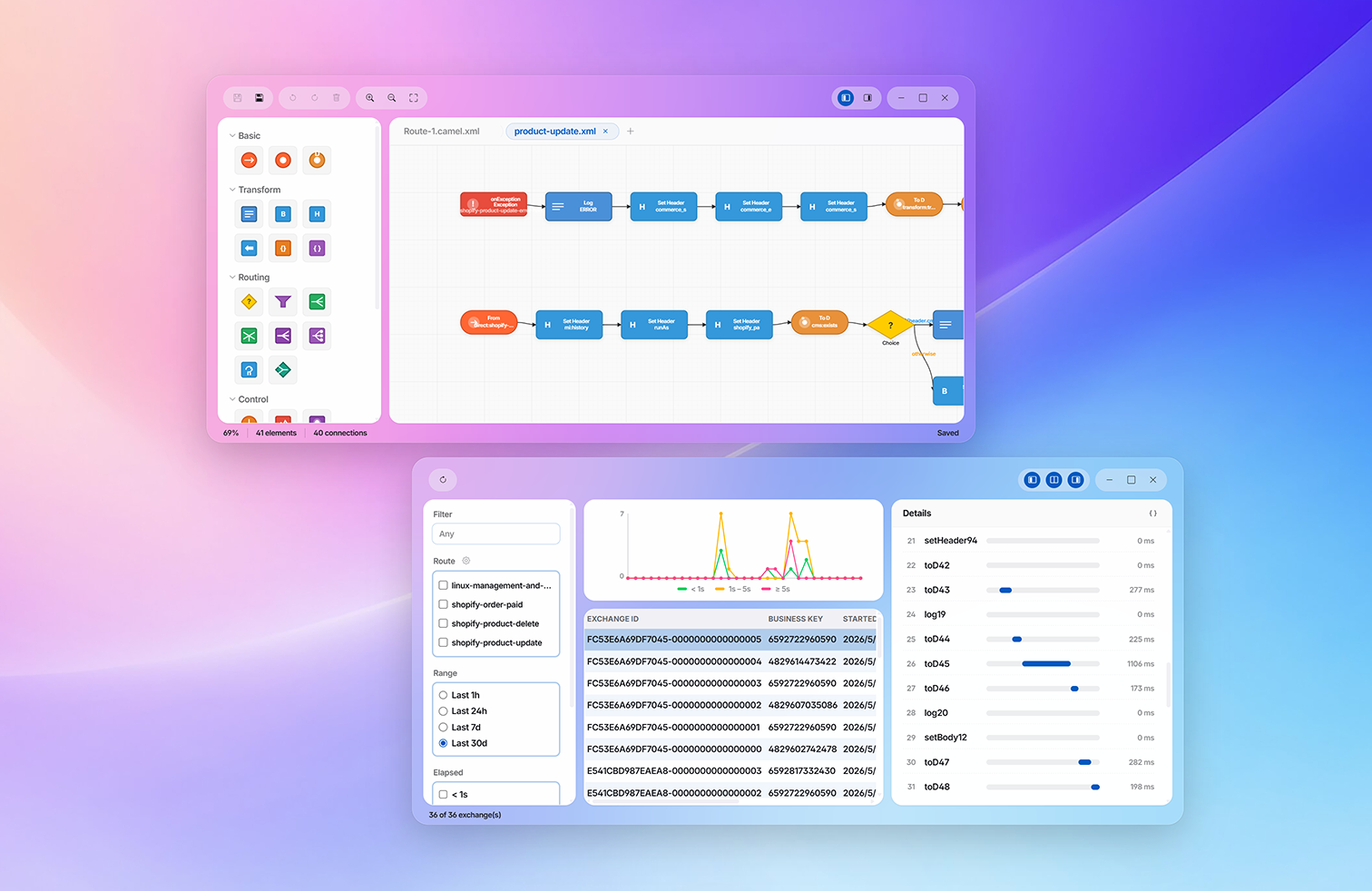
MintJams virtual desktop — data integration with EIP Modeler and EIP Console
Built on open standards and proven implementations
Docker
BPMN 2.0
EIP
OSGi
Java
GraphQL
Platform

The three pillars of operations,
brought to the same desktop.

Content management, business processes, and data integration. Three things that used to live in separate admin screens now run in a single workspace.

Content management

Organize articles and assets as naturally as files. A rich editor that's friendly to engineers and editors alike — not your usual WYSIWYG.

  • Content Browser — hierarchy, filters, smart folders
  • Text Editor — real-time preview, Markdown / HTML
  • Version history & scheduled publishing

Business processes

Design, run, and monitor BPMN 2.0 processes. User tasks are handled right on the desktop, too.

  • BPM Console — monitor processes, instances, and incidents
  • BPMN Modeler — design processes by dragging
  • Tasks — claim and complete user tasks

Data integration

Design and run data integrations with external systems through EIP-based flows. Throughput and bottlenecks are visualized on a dashboard.

  • EIP Console — route monitoring, exchange history, metrics
  • EIP Modeler — design EIP routes visually
  • Connect to external systems with a wide range of EIP components
01 — Content management

Move content
like files.

Articles, images, and templates — handle them all in the familiar world of files and folders. Keep the editor open while you swap media beside it and check the preview alongside. No more jumping between tabs.

01
Multi-window editing

Open the editor, browser, and preview at once and write it all on one desk.

02
Smart folders and filters

Save virtual folders that dynamically narrow by name, status, or update date.

03
Real-time preview

Edit HTML / Markdown and render it instantly in a separate window.

localhost:8080/desktop
Screenshot of Text Editor and Content Browser
02 — Business processes

Design your processes,
run them, watch them.

Design BPMN 2.0 processes by dragging, then run and monitor them as-is. Assigning manual tasks to people and reviewing them is all done on the same desktop.

01
BPMN Modeler

Define processes by dragging events, tasks, and gateways. Deploy instantly.

02
Live monitoring with BPM Console

See running processes, execution paths, and manual task status on one screen.

03
Tasks — assigning work to people

Claim manual tasks like approvals and stock checks, hand them to the team, and feed review results back.

localhost:8080/desktop
Screenshot of BPMN Modeler / EIP Modeler / BPM Console / Tasks
03 — Data integration

Make your integrations
visible.

Design and deploy EIP-based integration routes. A real-time processing dashboard lets you grasp throughput, bottlenecks, and errors on the spot.

01
EIP Modeler

Connect EIP patterns like From / To / Filter / Choice by dragging to design routes visually.

02
Live monitoring with EIP Console

Visualize throughput, latency, and error rates on a timeline. Bottlenecks at a glance.

03
A rich set of endpoints

Connect to a wide variety of external systems and services.

localhost:8080/desktop
Screenshot of Preferences / OSGi Console / Identity Manager
Components

This much is included from day one.

The standard apps. Launch them all at once, arrange them freely, and switch between them instantly from the Dock.

Content Browser icon

Content Browser .app

A file management app with hierarchy, smart folders, and filters.

Text Editor icon

Text Editor .app

Rich HTML / Markdown editing with live preview and find & replace.

BPM Console icon

BPM Console .app

Monitor process definitions, instances, and incidents, and deploy BPMN.

BPMN Modeler icon

BPMN Modeler .app

Drag-and-drop design of BPMN 2.0 diagrams. Deploy instantly.

Tasks icon

Tasks .app

Start business processes, and claim / assign / review / complete manual tasks.

EIP Console icon

EIP Console .app

EIP route monitoring, exchange history (execution logs), metrics, and error detection.

EIP Modeler icon

EIP Modeler .app

Visual design of EIP routes. Deploy per flow.

OSGi Console icon

OSGi Console .app

Manage OSGi bundles and components right on the virtual desktop.

Identity Manager icon

Identity Manager .app

Manage users, roles, memberships, and passwords.

Preferences icon

Preferences .app

Personal settings for theme, wallpaper, and desktop layout.

Schema Manager icon

Schema Manager .app

Define, compose, and validate JCR properties and metadata schemas.

Your own apps, too .app

Apps written in HTML / JS can be added to the same desktop just by placing them.

Background

Why a "virtual desktop"?

Modern web operations scatter across too many screens — consoles, log viewers, CMS, CI, dashboards. MintJams CMS was born to put them all back onto a single desk.

Before

Operating scattered admin screens

  • CMS, BPM tools, the integration platform, and identity management each on their own domain
  • Days just to configure SSO. Login hell
  • Hopping between five tabs every time you chase a bottleneck
  • A different experience for every user, driving up training cost
With MintJams CMS

Operations consolidated onto one desk

  • Every app runs on the same desktop and can be placed freely
  • Users, permissions, and themes managed together — all with a single sign-in
  • Throughput and errors shown side by side on a shared dashboard
  • Your own apps can be added to the platform, unifying the operations UX
Quickstart

If Docker runs,
your desk opens right away.

Installation is a single step. The beta runs fully on your local machine.

  • 01
    Pull the image and start it

    Docker Desktop or Engine is all you need.

  • 02
    Open it in your browser

    Go to http://localhost:8080.

  • 03
    Sign in as admin

    Sign in with the initial password generated on first launch. The desktop comes up right away.

  • 04
    Lay out apps on your desk and get going

    Just open the apps you need from the menu and arrange them however you like.

~/work — bash
# Start the latest beta (specify the public URL)
$ docker run -d --name mintjams \
    -p 8080:8080 \
    -e CMS_PUBLIC_BASE_URL=http://localhost:8080 \
    -v cms-repository:/data/repository \
    -v cms-secrets:/data/secrets \
    mintjams/cms:0.1.10-beta

# Retrieve the initial password (auto-generated on first launch)
$ docker exec mintjams cat /data/repository/INITIAL_PASSWORD.txt
Extensibility

Let your own apps live on the desk.

All you need is HTML and JavaScript. Write your team's own apps and add them to the same desktop. Internal tools and business-specific screens alike, all on one desk.

  • Just place HTML / JS in the repository
  • A shared UI framework and theming keep the look consistent
  • Share the same Identity / Preferences as the standard apps
  • Your apps can be called from BPM/EIP for integration, too
  • Advanced extensions can be added as OSGi bundles
// apps installed on your desk
Content
BPM
EIP
Identity
+
+
InventoryWatch.app

Your own business app — running alongside on the same desk

FAQ

The things on your mind, up front.

How is this different from an ordinary headless CMS?

As a delivery model it shares the same philosophy as a headless CMS, but MintJams CMS makes its admin a "virtual desktop environment" — and the decisive difference is that you can handle not just content but also BPM (business process management) and EIP (data integration) in the same workspace. It's a management platform that unifies even the back-end operations foundation.

What do I need to run it?

Just Docker. A single docker run lets you start and try it locally. For production you can deploy on either Docker or Kubernetes.

What does multi-window mean?

It means you can launch every app at once and work while freely adjusting their position and size. For example, you can design a process in BPMN Modeler while monitoring EIP Console execution logs beside it and keeping Tasks open in the back. Save your session on sign-out and the layout is restored on your next sign-in.

How do I build my own apps?

You build apps in HTML and JavaScript and place them in the repository together with an app definition (app.yml). The server detects them automatically and adds them to the desktop, so no build or server restart is required. You can share the standard UI framework and theming, plus Identity and Preferences, to match the look and feel of the standard apps. When you need advanced server-side extensions, OSGi bundles are available too. See "Building Apps" in the docs for details.

Can I self-host it?

Yes. Every component runs in your own environment. There is no cloud dependency. It's well suited to enterprise use cases where you want clarity over where your data lives.

What about licensing and pricing?

MintJams CMS is open-source software published on GitHub (mintjamsinc/cms0) under the MIT License. For commercial support and SLA-backed operations services, please contact our sales team.

Beta is open

Open your desk today.

One Docker command, and your operations desk comes up in the browser.

$ docker run -p 8080:8080 -e CMS_PUBLIC_BASE_URL=http://localhost:8080 mintjams/cms:0.1.10-beta